AI Appointment Booking sounds simple, but managing appointments throughout the day can take up a surprising amount of staff time. Customers may call when reception is busy, ask about different time slots, reschedule existing bookings, or leave messages when nobody is available.
AI voice technology provides another way to manage this process. Instead of requiring every caller to speak with a receptionist, an AI-powered voice system can have a conversation with the customer, understand their request, check available times, and guide them through the booking process.
This makes How AI Voice Tools Book Appointments 24/7—calendar sync, conflict handling, and reminder flows for Canada. a practical consideration for businesses that receive appointment calls outside regular working hours or experience high call volumes.
From dental practices and clinics to professional services, home services, and other appointment-based businesses, automated voice booking can help organize repetitive scheduling tasks while keeping human staff available for conversations that require personal attention.
What Is Appointment Booking with AI Voice?
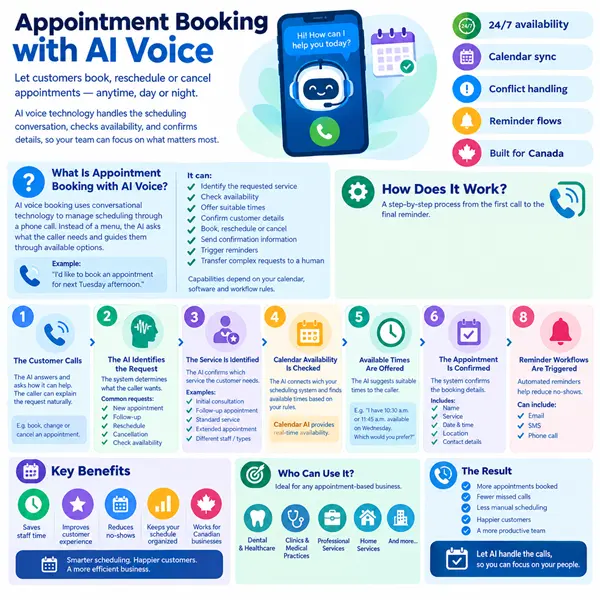
Appointment booking with AI voice uses conversational technology to manage scheduling through a phone conversation.
Instead of asking callers to navigate a complicated phone menu, the AI can ask what they need and guide them through the available booking options.
For example, a caller might say:
“I’d like to book an appointment for next Tuesday afternoon.”
The AI can then determine the type of appointment, check the connected calendar, and ask follow-up questions if necessary.
Depending on the system’s configuration, it may be able to:
- Identify the requested service
- Check availability
- Offer suitable appointment times
- Confirm the customer’s details
- Book the appointment
- Reschedule an existing booking
- Cancel an appointment
- Send confirmation information
- Trigger reminders
- Transfer unusual requests to a human employee
The exact capabilities depend on the business’s calendar, software integrations, and workflow rules.
How Does AI Voice Appointment Booking Work?
1. The Customer Calls
The process starts when a customer calls the business.
The AI voice assistant answers and asks how it can help. Because the interaction is conversational, the customer can explain the request naturally instead of selecting from a long list of menu options.
For example, the customer may ask to book, change, or cancel an appointment.
2. The AI Identifies the Request
The system determines what the caller wants.
A caller might be looking for:
- A new appointment
- A follow-up appointment
- A rescheduling request
- A cancellation
- Information about appointment availability
The AI can ask additional questions when the initial request is not specific enough.
3. The Service Is Identified
Before checking availability, the system may need to understand which service the customer wants.
For example, a business could offer:
- Initial consultations
- Follow-up appointments
- Standard services
- Extended appointments
- Different appointment types with different staff
Identifying the service helps the system check the correct availability rather than offering inappropriate time slots.
4. Calendar Availability Is Checked
The AI then connects with the business’s scheduling system or calendar, where supported.
This is where calendar AI can become useful.
Rather than relying on a static list of appointment times, the system can work with current availability and offer times based on the configured scheduling rules.
For example, if the customer asks for Wednesday morning, the system can check the relevant calendar and provide available options.
5. Available Times Are Offered
The AI can offer suitable appointment times to the caller.
For example:
“I have 10:30 a.m. or 11:45 a.m. available on Wednesday. Which would you prefer?”
The customer can select a time without needing to wait for a staff member to check the calendar manually.
6. The Appointment Is Confirmed
Once the customer selects a suitable time, the system can confirm the booking details.
It may confirm:
- Customer name
- Service
- Date
- Time
- Location
- Contact details
The system can then create the appointment if the relevant integration supports automated booking.
7. Confirmation Is Sent
After booking, the system can trigger a confirmation through an available communication channel.
Depending on the business setup, this could include an email or SMS confirmation.
The confirmation gives the customer a record of the appointment and can reduce uncertainty about the booking details.
8. Reminder Workflows Are Triggered
The appointment does not have to end with the initial booking.
Automated reminder workflows can be configured to contact customers before their appointment.
This can help businesses create a more consistent process for appointment reminders, confirmations, and rescheduling instructions.
What Is Voice Booking AI?
Voice booking AI refers to AI technology that allows customers to make appointments through a spoken phone conversation.
The customer does not necessarily need to use a website or mobile application.
Instead, the AI can guide them through the booking process by voice.
This can be useful for customers who prefer calling or for businesses where phone inquiries remain an important source of appointments.
A voice booking system can also operate outside traditional reception hours, depending on the configuration.
How Does Calendar AI Support Booking?
Calendar AI can help connect conversational booking with real-time scheduling information.
A traditional voice assistant might collect a customer’s preferred date and time and then ask an employee to complete the booking manually.
With an appropriate calendar integration, the automated workflow can check available slots as part of the conversation.
This can reduce the need for staff to repeatedly check calendars for simple booking requests.
However, the calendar integration needs to be configured correctly. Availability rules, working hours, appointment durations, holidays, buffer periods and staff schedules should all be considered.
What Is Scheduling AI?
Scheduling AI uses artificial intelligence to support tasks involved in organizing appointments and calendars.
Depending on the system, scheduling AI may help with:
- Finding available appointment times
- Matching services with appropriate staff
- Managing scheduling rules
- Rescheduling appointments
- Handling cancellations
- Triggering reminders
- Coordinating multiple calendars
The value comes from connecting these functions into a single workflow rather than treating each task separately.
How Does AI Handle Scheduling Conflicts?
Scheduling conflicts can occur when multiple people attempt to book the same time, calendars change, or appointment requirements differ.
A properly configured system should check current availability before confirming an appointment.
For example, if a requested time is already occupied, the AI can offer alternative slots rather than confirming an unavailable appointment.
Businesses can also establish rules around:
- Minimum notice periods
- Appointment duration
- Staff availability
- Breaks
- Buffer times
- Working hours
- Holidays
- Multiple locations
These rules help make automated booking more predictable.
What Is a Booking Bot Canada Businesses Can Use?
A booking bot Canada businesses use can be designed around their specific scheduling needs rather than relying on a generic booking flow.
For example, a Canadian business might configure its AI booking system to account for:
- Canadian business hours
- Multiple locations
- Different staff calendars
- Appointment types
- Time zones
- Holiday schedules
- Local customer preferences
The system should be designed around the actual booking process rather than forcing the business to change its entire workflow to accommodate automation.
Can AI Handle Rescheduling and Cancellations?
Yes, appointment automation can extend beyond new bookings.
A customer might call and say:
“I can’t make my appointment tomorrow. Can I move it to next week?”
The AI can identify the request, verify the relevant booking information, and, where supported, check alternative availability.
It can then offer available options according to the business’s scheduling rules.
Similarly, cancellation requests can follow a predefined workflow.
For situations involving special circumstances, refunds, or policy exceptions, the system can transfer the caller to an employee.
What Are the Benefits of AI Appointment Booking?
24/7 Availability
An automated voice system can potentially accept booking requests outside normal business hours.
Customers do not necessarily have to wait until the next working day to request an appointment.
Reduced Administrative Work
Staff spend less time handling repetitive scheduling calls and can focus on other responsibilities.
Faster Booking
Customers can receive available appointment options during the call instead of waiting for a callback.
Consistent Scheduling
Automated workflows can apply the same booking rules to similar requests.
Better Calendar Management
When connected properly, the system can use current availability rather than relying on manually maintained lists of appointment slots.
What Should Businesses Consider Before Using AI Voice Booking?
Automation should be planned carefully before it is introduced to customer calls.
Define Your Services
List the appointment types customers can book and how long each appointment should take.
Establish Calendar Rules
Define working hours, breaks, holidays, buffers, and staff availability.
Create Escalation Rules
Decide which situations require a human employee.
Connect the Right Systems
Determine which calendar, CRM, booking platform, or other business tools need to communicate with the AI.
Keep Customer Information Secure
Businesses should establish appropriate privacy and data-handling processes when collecting customer information through automated calls.
Test the Workflow
Before launching the system, test common booking requests, unusual questions, cancellations, and scheduling conflicts.
Conclusion
Appointment scheduling involves many repetitive tasks, from checking calendars and offering available times to confirming bookings and sending reminders. For businesses handling a large number of appointment calls, these tasks can consume valuable staff time.
How AI voice tools book appointments 24/7—calendar sync, conflict handling, and reminder flows for Canada. is becoming an important consideration for businesses looking to make their scheduling process more accessible and efficient.
With voice booking AI, customers can make appointments through natural phone conversations. Calendar AI can help connect those conversations with current availability, while scheduling AI can support booking, rescheduling, and reminder workflows.
A properly configured booking bot Canada businesses can use should not simply automate every conversation. It should follow clear scheduling rules, protect customer information, and provide a smooth handoff to human staff whenever the situation requires it.
Frequently Asked Questions
1. Can AI voice tools book appointments automatically?
Yes, when connected to a compatible scheduling or calendar system, an AI voice tool can guide customers through booking and create appointments according to configured rules.
2. Can AI booking work 24/7?
AI voice systems can be available outside normal business hours, allowing customers to make booking requests when staff are unavailable. The exact availability depends on the system configuration.
3. What is voice booking AI?
Voice booking AI allows customers to schedule appointments through a conversational phone interaction rather than requiring them to use a website or speak with a receptionist.
4. How does calendar AI prevent double bookings?
A properly integrated system checks current calendar availability before confirming a time. If the requested slot is unavailable, it can offer alternative times based on configured scheduling rules.
5. Can scheduling AI reschedule appointments?
Yes. Depending on the available integrations, scheduling AI can help customers change appointment times by checking alternative availability and updating the booking.
6. Can AI handle appointment cancellations?
Yes. Cancellation workflows can be configured so the AI identifies the customer’s booking and follows the business’s cancellation rules. Complex cases can be transferred to staff.
7. What is a booking bot Canada businesses can use?
A booking bot Canada businesses can use is an automated booking solution configured for their services, calendars, staff availability, and customer workflows.
8. Can AI send appointment reminders?
Yes. Reminder workflows can be connected to the booking process so customers receive scheduled reminders through supported communication channels.
9. Can customers still speak with a person?
Yes. Human handoff can be built into the workflow. If a request is complex or outside the AI’s defined capabilities, the system can transfer the customer to an appropriate employee.