When a business receives a steady flow of phone calls, answering every call manually can become difficult. Customers may call with questions, appointment requests, service enquiries, pricing questions, or urgent requests. If staff are busy, calls can be placed on hold, transferred between departments, or missed altogether.
Inbound call automation uses AI and automated workflows to manage incoming calls more efficiently. Instead of treating every caller the same way, an automated system can identify the reason for the call, collect relevant information, answer common questions, route the caller, and involve a human team member when necessary.
For Canadian businesses, this can be especially useful for managing call volumes across different departments, locations, and service teams.
This guide explains how inbound call automation works, what inbound AI calls can handle, how AI call intake works, where inbound routing AI fits into the process, and what businesses should consider before implementing an automated calling system.
What Is Inbound Call Automation?
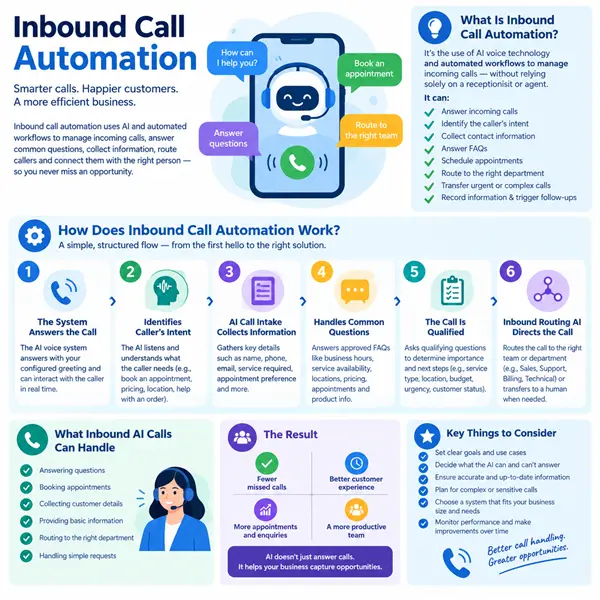
Inbound call automation is the use of AI-powered voice technology and automated workflows to manage incoming phone calls.
Rather than relying entirely on a receptionist or customer service representative, an automated system can interact with callers, understand their requests, and take predefined actions.
Depending on how the system is configured, it may be able to:
- Answer incoming calls
- Identify the caller’s reason for contacting the business
- Ask qualifying questions
- Collect contact information
- Answer frequently asked questions
- Schedule appointments
- Route calls to the appropriate department
- Transfer urgent or complex enquiries
- Record relevant information
- Trigger follow-up actions
The objective is not necessarily to remove people from the process. In many cases, automation handles repetitive tasks while human employees focus on conversations that require judgement, empathy, or specialised knowledge.
How Does Inbound Call Automation Work?
An automated inbound call system generally follows a structured workflow from the moment a customer calls.
1. The System Answers the Call
When an incoming call arrives, the AI voice system answers according to the business’s configured greeting and workflow.
Instead of simply playing a recorded message, conversational AI can interact with the caller and respond to what they say.
This gives the caller a more interactive experience from the beginning.
2. The AI Identifies the Caller’s Intent
The system listens to the caller and determines what they need.
For example, a caller may say:
- “I’d like to book an appointment.”
- “I have a question about your pricing.”
- “Can you tell me where you’re located?”
- “I need help with an existing order.”
- “I’d like to speak with sales.”
The AI uses this information to determine which workflow should be activated.
3. AI Call Intake Collects Information
The next stage can involve AI call intake, where the system gathers information needed to handle the inquiry.
Depending on the business, this may include:
- Name
- Phone number
- Email address
- Service required
- Appointment preference
- Existing customer information
- Basic qualifying details
The questions can be adapted according to the purpose of the call.
For example, a business receiving service enquiries might ask about the type of service required and the caller’s location before deciding what should happen next.
4. Common Questions Are Handled
Many inbound calls involve questions that employees answer repeatedly.
An AI system can respond to approved FAQs such as
- Business hours
- Service availability
- Locations
- General pricing information
- Appointment procedures
- Basic product information
- Delivery or booking information
The business should provide accurate information and establish clear boundaries around what the AI is allowed to answer.
If a question falls outside those boundaries, the call can be transferred to a person.
5. The Call Is Qualified
Not every inquiry has the same level of importance.
AI can ask predefined qualifying questions to help determine what happens next.
For example, a sales inquiry could be classified according to:
- Service required
- Customer type
- Location
- Budget range
- Urgency
- Existing customer status
This can help staff receive more useful information when a call is transferred.
6. Inbound Routing AI Directs the Call
Inbound routing AI helps determine where a call should go.
Instead of asking every caller to navigate a long menu, the system can identify their intent and route the conversation accordingly.
For example:
Sales enquiry → Sales team
Technical issue → Support team
Appointment request → Booking workflow
Billing question → Accounts team
Urgent issue → Appropriate human representative
This can reduce unnecessary transfers and help customers reach the right person more quickly.
7. Human Handoff Happens When Needed
Automation should have a clear handoff process.
If the caller asks to speak with a person, has a complex issue, or reaches a situation outside the AI’s capabilities, the system can transfer the call.
Useful information collected earlier in the conversation can be passed to the employee so the caller does not have to repeat everything.
This creates a combination of automation and human support rather than forcing every conversation through AI.
8. Information Can Be Recorded
After a call, relevant information can be captured in the business’s connected systems.
Depending on the setup, this could include:
- Caller details
- Call reason
- Qualification responses
- Appointment information
- Call outcome
- Follow-up requirements
This can reduce manual data entry and provide staff with a clearer record of the interaction.
What Are Inbound AI Calls?
Inbound AI calls are incoming customer calls handled partly or entirely by an AI-powered voice system.
Unlike traditional automated phone menus that rely heavily on keypad selections, conversational AI can allow callers to explain what they need in natural language.
For example, instead of asking a customer to “press 1 for sales, press 2 for support,” the AI could ask:
“How can I help you today?”
The caller can then describe the issue in their own words.
The system can use that response to determine the appropriate workflow.
This can make inbound call handling more conversational while still maintaining business rules and routing controls.
What Are the Benefits of Inbound Call Automation?
Faster Response Times
An automated system can answer calls without requiring a member of staff to become available first.
This can be useful when call volumes increase or employees are already handling other tasks.
Reduced Repetitive Work
Employees may spend significant time answering the same basic questions or collecting the same information.
Automation can handle repetitive interactions so staff can focus on more complex work.
Better Call Qualification
AI can collect information before transferring a caller, giving employees useful context before the conversation begins.
More Consistent Call Handling
A properly configured workflow can provide consistent greetings, qualifying questions, and approved answers.
Support Beyond Business Hours
Depending on the system and business requirements, automated calling workflows can operate outside normal office hours.
This can allow callers to obtain basic information or leave structured inquiries without waiting for the next business day.
Which Businesses Can Use Inbound Call Automation?
Inbound automation can be adapted to many industries.
Examples include:
- Healthcare practices
- Property management companies
- Professional services
- Home service businesses
- Automotive businesses
- Hospitality
- Education providers
- E-commerce companies
- Financial service businesses
- Technology companies
The most useful applications tend to involve businesses that receive frequent calls with repeatable questions, appointment requests, inquiries, or routing needs.
What Should Businesses Consider Before Automating Calls?
Automation works best when the underlying workflow is clearly defined.
Before implementing a system, consider:
Call Volume
Understand how many calls the business receives and when the busiest periods occur.
Common Call Reasons
Identify the questions and requests that appear most frequently.
Escalation Rules
Decide which situations require immediate human involvement.
Information Requirements
Determine what information should be collected during each type of call.
Integration
Consider whether the system needs to connect with a CRM, calendar, helpdesk, or other business software.
Privacy and Data Handling
Businesses should establish appropriate processes for handling caller information and follow applicable privacy and data protection requirements.
Accuracy
AI should only provide information that the business has approved and can maintain accurately.
Is Inbound Call Automation Replacing Human Staff?
Not necessarily.
A well-designed system can support human employees rather than replacing every customer interaction.
For example, AI may handle the initial call, collect information, and identify the caller’s intent. A human employee can then take over when the situation requires judgement, negotiation, technical expertise, or personal support.
This approach allows businesses to divide call handling between automated and human workflows.
The goal is to make the overall process more efficient while keeping human involvement where it adds value.
Conclusion
Managing incoming calls manually can become challenging as a business grows. Calls may arrive while employees are busy, customers may need to repeat information, and simple inquiries can take valuable staff time.
Inbound call automation provides another approach by allowing AI to answer calls, identify caller intent, collect information, handle routine questions, and route conversations according to predefined workflows.
With AI call intake, businesses can collect useful information before a conversation reaches an employee. Inbound routing AI can then direct callers to the appropriate team or workflow, while inbound AI calls can provide conversational support for common inquiries.
The most effective setup is not simply about automating as many calls as possible. It is about identifying which parts of the customer journey can be automated reliably and where human involvement remains important.
Frequently Asked Questions
1. What is inbound call automation?
Inbound call automation uses AI and automated workflows to manage incoming business calls. It can answer questions, collect information, qualify inquiries, route calls, and transfer conversations to human staff when required.
2. What is the difference between inbound AI calls and traditional IVR?
Traditional IVR systems commonly rely on predefined menus and keypad selections. Inbound AI calls can use conversational AI to understand spoken requests and determine the appropriate workflow.
3. What does AI call intake mean?
AI call intake refers to using AI to collect information from callers at the beginning of an interaction. The system can ask questions, record responses, and prepare relevant information before the call is transferred or completed.
4. What is inbound routing AI?
Inbound routing AI uses information from a caller’s conversation or responses to determine where the call should be directed. It can route callers to departments, employees, or specific workflows based on predefined rules.
5. Can AI schedule appointments?
Yes. When connected to an appropriate scheduling system, an AI calling workflow can collect appointment preferences and, depending on the configuration, schedule or manage bookings.
6. Can a caller speak to a human?
Yes. A properly designed system can include human handoff rules. Calls can be transferred when a caller requests a person or when the conversation reaches a situation that the AI is not designed to handle.
7. Can inbound call automation answer FAQs?
Yes. AI can answer approved frequently asked questions when the relevant information has been configured correctly. Businesses should regularly review information to help ensure responses remain accurate.
8. Is inbound call automation suitable for small businesses?
It can be. Small businesses that receive regular calls but have limited staff availability may use automation for common inquiries, lead qualification, booking requests, and call routing.