Setting up AI receptionist is no longer just a technology upgrade for large companies. Canadian small and mid-sized businesses are increasingly using AI receptionists to answer calls, qualify enquiries, book appointments, route callers, and provide support outside regular business hours.
A well-configured AI receptionist can sound natural while following the same processes as a traditional front desk team. However, successful deployment requires more than connecting a phone number to an AI system. Businesses need to define call workflows, provide accurate information, connect calendars or CRMs, test different scenarios, and establish clear rules for when a human should take over.
For Canadian businesses, privacy also needs to be considered from the beginning. The Office of the Privacy Commissioner of Canada highlights accountability, meaningful consent, limiting collection, safeguards, openness, and appropriate retention as important privacy principles under PIPEDA.
Here is a practical guide to setting up AI receptionist properly.
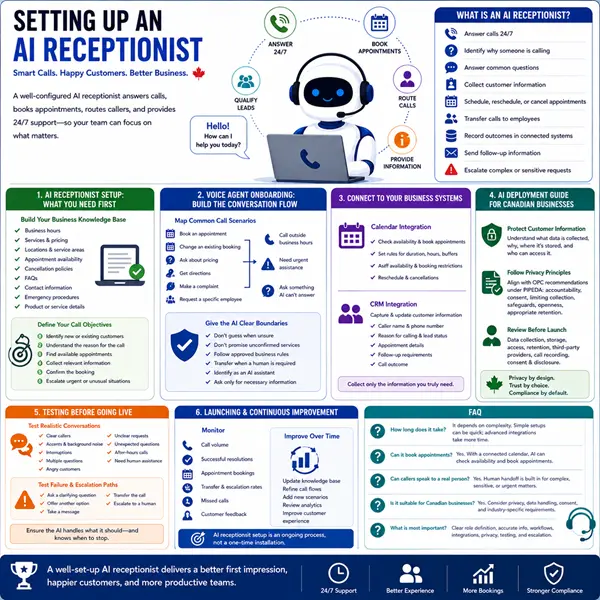
What Is an AI Receptionist?
An AI receptionist is a voice-based AI system that handles incoming business calls and performs tasks based on predefined instructions, business information, and connected tools.
Depending on the business, it can:
- Answer calls 24/7
- Identify why someone is calling
- Answer common questions
- Collect customer information
- Qualify leads
- Schedule, reschedule, or cancel appointments
- Transfer calls to employees
- Send follow-up information
- Record call outcomes in connected systems
- Escalate complicated or sensitive requests to a person
The goal is not necessarily to replace every human conversation. Instead, an AI receptionist should handle routine calls efficiently while making sure important conversations reach the right person.
AI Receptionist Setup: What You Need First
Before deployment, gather the information the AI will need to represent your business accurately.
Build Your Business Knowledge Base
Start with the information customers commonly ask about.
This may include:
- Business hours
- Services and pricing information
- Locations and service areas
- Appointment availability
- Cancellation policies
- Frequently asked questions
- Contact information
- Emergency procedures
- Basic product or service details
Keep this information current. An AI receptionist can only provide reliable answers when its underlying information is accurate.
Define Your Call Objectives
Decide what you actually want the AI to accomplish.
For example, a dental clinic may want the receptionist to:
- Identify whether the caller is an existing or new patient.
- Understand the reason for the call.
- Find an available appointment.
- Collect relevant contact information.
- Confirm the booking.
- Escalate urgent or unusual situations.
Clear objectives make the AI receptionist easier to configure and test.
Voice Agent Onboarding: Build the Conversation Flow
The next stage of voice agent onboarding is designing how conversations should work.
Instead of giving the AI one long instruction, create clear conversation paths for common situations.
Map Common Call Scenarios
Consider what happens when a caller:
- Wants to book an appointment
- Needs to change an existing booking
- Asks about pricing
- Wants directions
- Has a complaint
- Requests a specific employee
- Calls outside business hours
- Needs urgent assistance
- Asks something the AI cannot answer
Each scenario should have a defined response and next step.
Give the AI Clear Boundaries
The AI should know what it can and cannot do.
For example:
- Do not guess an answer when information is unavailable.
- Do not promise a service that has not been confirmed.
- Do not make decisions outside approved business rules.
- Transfer calls when a human is required.
- Clearly identify itself as an AI assistant when appropriate.
- Ask only for information that is necessary for the task.
These boundaries help prevent confident but incorrect answers.
Connecting Your AI Receptionist to Business Systems
An AI receptionist becomes considerably more useful when connected to the tools your team already uses.
Calendar Integration
Calendar access allows the AI to check availability and book appointments instead of simply taking messages.
Set rules for:
- Appointment duration
- Available working hours
- Buffer periods
- Staff availability
- Booking restrictions
- Rescheduling and cancellation rules
CRM Integration
CRM integration can help capture information from calls and keep customer records updated. Modern voice-agent workflows can connect conversations with CRM records, follow-up tasks, lead qualification, and other business processes.
Useful information to capture may include:
- Caller name
- Phone number
- Reason for calling
- Lead status
- Appointment details
- Follow-up requirements
- Call outcome
The exact data collected should be limited to what the business genuinely needs.
AI Deployment Guide for Canadian Businesses
Canadian businesses should treat privacy as part of deployment rather than something to consider after launch.
Protect Customer Information
Calls may involve names, phone numbers, appointment details, account information, or other personal information. Businesses should understand what information the AI collects, why it is collected, where it is stored, who can access it, and how long it is retained.
The Privacy Commissioner of Canada advises organizations to build privacy protections into their operations and maintain clear policies for collecting, using, and disclosing personal information.
Before launching, review:
- Data collection practices
- Storage and retention policies
- Access permissions
- Third-party AI providers
- Call recording practices
- Customer disclosure and consent requirements
- Applicable federal or provincial privacy rules
Privacy requirements can vary depending on the business, province, industry, and type of information involved.
Testing Before Going Live
Never assume the AI is ready simply because it can complete a successful test call.
Test Realistic Conversations
Run different scenarios, including:
- Clear callers
- Customers with strong accents
- Background noise
- Interruptions
- Multiple questions
- Angry customers
- Unclear requests
- Unexpected questions
- Requests outside business hours
- Calls requiring human assistance
Listen to the complete conversations and identify where callers become confused.
Test Failure and Escalation Paths
A reliable AI receptionist needs a fallback plan.
If it cannot confidently handle a request, it should:
- Ask a clarifying question
- Offer another appropriate option
- Take a message
- Transfer the call
- Escalate to a human
The purpose of testing is not to make the AI handle everything. It is to make sure it handles the things it should handle and knows when to stop.
Launching and Improving the AI Receptionist
Once testing is complete, introduce the AI receptionist gradually if possible.
Monitor:
- Call volume
- Successful call resolution
- Appointment bookings
- Transfer rates
- Missed calls
- Customer complaints
- Frequently asked questions
- Calls requiring escalation
Use this information to improve the conversation flows and knowledge base.
AI receptionist setup should be treated as an ongoing process, not a one-time installation. Business information changes, customer questions evolve, and new workflows may become useful over time.
Final Thoughts
Setting up AI receptionist is about more than automating phone calls. It is about creating a dependable first point of contact for customers while giving employees more time to focus on work that requires human attention.
With thoughtful voice agent onboarding, carefully designed workflows, useful integrations, privacy-conscious data practices, and continuous testing, Canadian businesses can deploy an AI receptionist that feels practical rather than robotic and helpful rather than intrusive.
Frequently Asked Questions
1. How long does it take to set up an AI receptionist?
The timeline depends on the business and the complexity of its workflows. A simple receptionist handling FAQs and call routing can be configured relatively quickly, while businesses requiring CRM, calendar, payment, or complex escalation integrations may need more testing and configuration.
2. Can an AI receptionist book appointments?
Yes. When connected to a compatible calendar or scheduling system, an AI receptionist can check availability and handle appointment bookings according to the business’s rules.
3. Can callers speak to a real person?
Yes. Human handoff can be built into the call flow. Businesses should define situations where calls must be transferred, such as complex requests, complaints, sensitive matters, or requests that require professional judgement.
4. Is an AI receptionist suitable for Canadian businesses?
Yes, but businesses should consider privacy, data handling, consent, and industry-specific requirements before deployment. Canadian organizations remain responsible for how personal information is collected, used, disclosed, and protected.
5. What is the most important part of AI receptionist setup?
The most important part is defining the AI’s role clearly. A successful system combines accurate business information, practical call flows, appropriate integrations, strong privacy practices, thorough testing, and reliable human escalation.