An AI receptionist can answer calls, respond to routine questions, capture inquiries, and help businesses manage appointments. But its real value often comes from what happens after a conversation.
If an AI receptionist operates separately from your existing software, staff may still need to copy information between systems, update calendars manually, or enter new leads into a CRM. That creates unnecessary work and can increase the chance of missed information.
This is where AI receptionist integrations become important.
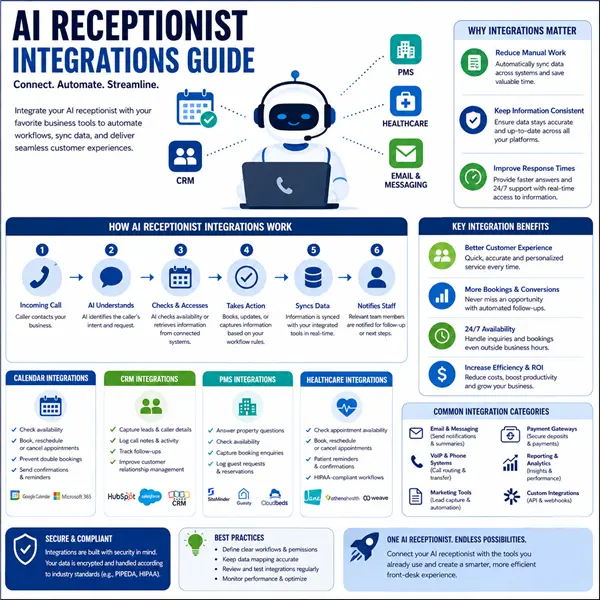
By connecting an AI receptionist with calendars, customer relationship management platforms, property management systems, healthcare practice tools, and other business software, organizations can create a more connected front-desk workflow.
For Canadian businesses, these integrations can be particularly useful across industries such as professional services, healthcare, property management, hospitality, real estate, and home services.
This guide explains how AI receptionist integrations work, which systems can typically be connected, what information can move between platforms, and what businesses should consider before setting them up.
What Are AI Receptionist Integrations?
AI receptionist integrations are connections between an AI-powered receptionist and other software used by a business.
Instead of keeping call information, appointments, customer details, and other data in separate systems, an integration allows relevant information to move between connected tools according to predefined rules.
For example, a caller might contact a business to schedule an appointment.
The AI receptionist could:
- Identify the caller’s request.
- Check availability through a connected calendar.
- Offer available appointment times.
- Confirm the selected time.
- Add the appointment to the calendar.
- Record the interaction in the CRM.
- Send relevant information to the staff member responsible for the appointment.
The exact workflow depends on the AI receptionist platform and the software being connected.
Why Integrations Matter for Modern Reception Teams
An AI receptionist can perform useful tasks independently, but integrations can make those tasks much more practical.
Reduce Manual Data Entry
Without integrations, employees may have to enter information from calls into several systems.
An integrated workflow can automatically transfer relevant details to the appropriate platform.
This can reduce repetitive administrative work and allow employees to focus on higher-value tasks.
Keep Information Consistent
When multiple systems contain customer or appointment information, inconsistencies can develop.
For example, a booking may appear on one calendar but not another.
Connecting systems can help create a more consistent flow of information.
Improve Response Times
When an AI receptionist can access approved business information through connected tools, it can handle routine requests without waiting for an employee to intervene.
This can be useful for businesses that receive inquiries outside normal office hours.
AI Receptionist and Calendar Integrations
Calendar connectivity is one of the most useful integrations for an AI receptionist.
A receptionist calendar integration can allow the system to check availability and coordinate appointments according to the rules established by the business.
Depending on the platform, the workflow may include:
- Checking available time slots
- Booking appointments
- Rescheduling appointments
- Cancelling appointments
- Confirming booking details
- Recording caller information
- Sending appointment-related notifications
For example, a dental clinic may allow its AI receptionist to check available appointment slots. A caller could request an appointment, and the system could identify suitable openings without requiring staff to manually search the calendar.
Why Calendar Synchronization Matters
Calendar synchronization can help reduce double bookings and unnecessary back-and-forth communication.
However, businesses should establish clear rules around availability, appointment duration, buffers, staff schedules, and booking permissions before activating the integration.
AI Receptionist and CRM Integrations
A CRM stores important information about customers, prospects, leads, and interactions.
Connecting an AI receptionist with a CRM can turn a phone conversation into structured customer information rather than leaving the details only in a call transcript.
What Can a CRM Integration Capture?
Depending on the CRM and AI receptionist, information may include:
- Caller name
- Contact details
- Reason for calling
- Service requested
- Lead source
- Appointment information
- Follow-up requirements
- Notes from the conversation
For example, a real estate company could use an AI receptionist to collect basic information from a potential buyer and send those details to the CRM for follow-up.
This is where a virtual receptionist CRM workflow can become useful. Rather than treating the virtual receptionist as a separate communication channel, businesses can connect it to the same customer-management process used by their human team.
AI Receptionist Integrations for Property Management
Property managers and accommodation businesses often rely on property management systems, commonly known as PMS platforms.
A PMS integration AI workflow can connect reception-related conversations with property or reservation information, depending on the capabilities of the systems involved.
Potential applications include:
- Answering property-related questions
- Checking approved availability information
- Capturing booking enquiries
- Recording guest requests
- Supporting reservation-related communications
- Passing complex requests to staff
For example, a guest might call to ask about check-in information. Instead of requiring a staff member to answer every routine question, the AI receptionist can provide approved information while escalating exceptions to the appropriate employee.
PMS integrations should be configured carefully because accommodation systems can contain sensitive reservation and guest information.
AI Receptionist Integrations for Healthcare Practices
Healthcare practices can use integrations to connect reception workflows with practice management systems, appointment calendars, and other approved tools.
Potential uses include:
- Appointment scheduling
- Appointment confirmations
- Basic administrative enquiries
- Patient information collection
- Cancellation requests
- Routing calls to appropriate staff
However, healthcare integrations require particular attention to privacy, security, permissions, and applicable Canadian requirements.
An AI receptionist should not be given unrestricted access simply because an integration is technically possible. Access should be limited to the information and actions required for its specific role.
Common Integration Workflows
The most useful integration is not necessarily the one with the most features. It is the one that solves a real operational problem.
Lead Capture Workflow
Caller → AI receptionist → CRM → Staff follow-up
The AI receptionist captures the inquiry and sends structured information to the CRM.
Appointment Workflow
Caller → AI receptionist → receptionist calendar → confirmation
The system checks approved availability and records the appointment.
Property Management Workflow
Guest → AI receptionist → PMS → staff escalation
Routine questions can be handled automatically while more complex requests are passed to staff.
What to Check Before Choosing an Integration
Businesses should evaluate more than whether two platforms technically connect.
Compatibility
Confirm that the AI receptionist supports the specific software and version your business uses.
Permissions
Determine exactly what the AI system can view, create, modify, or delete.
Data Security
Review how information is transmitted, stored, and protected.
Reliability
An integration that frequently fails can create more work rather than reducing it.
Human Escalation
Make sure the system can transfer calls or requests to a human when the AI reaches the limits of its role.
Auditability
Businesses should be able to determine what information was transferred and when, particularly for workflows involving sensitive information.
Best Practices for Setting Up AI Receptionist Integrations
A successful implementation starts with a clear workflow rather than simply connecting every available tool.
1. Start With One Business Process
Choose a repetitive task such as appointment scheduling or lead capture.
2. Map the Existing Workflow
Document what happens when a call arrives and where the information currently goes.
3. Define AI Permissions
Decide what the AI can access and what actions require human approval.
4. Test Before Going Live
Use controlled scenarios to test booking, CRM updates, transfers, and error handling.
5. Monitor Results
Review failed calls, incorrect bookings, missed transfers, and integration errors regularly.
6. Expand Gradually
Once the initial workflow works reliably, additional systems can be connected.
Canadian Businesses and Integration Considerations
Canadian organizations should consider privacy and data-handling requirements when implementing AI receptionist integrations.
The appropriate requirements can vary depending on the province, industry, type of information collected, and systems involved.
Businesses should therefore review:
- Data collection practices
- User permissions
- Information retention
- Vendor security policies
- Applicable privacy obligations
- Industry-specific requirements
For healthcare, financial services, legal services, and other sensitive environments, professional legal or compliance advice may be appropriate before deployment.
Conclusion
An AI receptionist becomes significantly more useful when it can work alongside the software a business already relies on. Calendar connections can streamline scheduling, CRM integrations can improve lead management, and PMS connections can support property and guest workflows.
The key is not simply connecting as many platforms as possible. Effective AI receptionist integrations should be built around clearly defined processes, appropriate permissions, reliable data transfer, and straightforward human escalation.
For Canadian businesses, privacy, security, and industry-specific requirements should also be considered before connecting systems or allowing an AI receptionist to access business information.
Start with one repetitive workflow, test it carefully, monitor the results, and expand gradually. This approach can help businesses build an AI-assisted reception system that complements their existing team rather than creating another disconnected tool.
Frequently Asked Questions
1. What are AI receptionist integrations?
AI receptionist integrations connect an AI receptionist with business software such as calendars, CRMs, PMS platforms, and practice-management systems. They allow relevant information to move between systems according to defined workflows.
2. Can an AI receptionist book appointments?
Yes, if the receptionist platform supports calendar connectivity and has permission to create or modify appointments. Businesses should configure scheduling rules carefully before enabling automated booking.
3. What is a receptionist calendar integration?
A receptionist calendar integration connects the AI receptionist to an approved scheduling system so it can check availability and potentially create, reschedule, or cancel appointments.
4. Can an AI receptionist connect to a CRM?
Yes. CRM connectivity can allow caller information, enquiry details, and follow-up notes to be transferred into a customer-management platform.
5. What is a PMS integration AI workflow?
A PMS integration AI workflow connects an AI receptionist with a property management system so it can support approved reservation or guest-service workflows.
6. Should every business connect all its software?
Not necessarily. Businesses should start with integrations that solve specific operational problems and expand only when there is a clear benefit.