
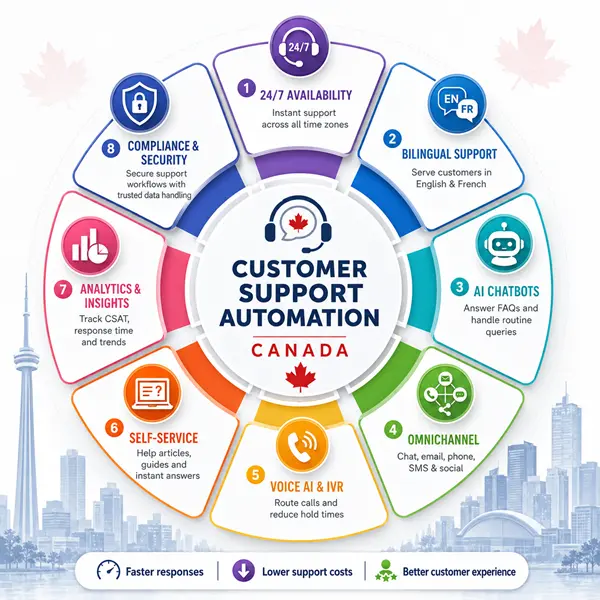
Customer expectations have shifted dramatically in recent years. People now expect fast, reliable, and personalized support around the clock. In Canada, a country known for its cultural diversity, bilingual populations, and highly competitive industries, meeting these expectations through traditional customer service methods is becoming increasingly difficult.
Long wait times, overloaded support teams, inconsistent responses, and rising operational costs are universal pain points. To address them, many Canadian organizations are adopting customer support automation Canada strategies using artificial intelligence, machine learning, and automated systems to improve the quality, speed, and scalability of customer support.
In this blog, we will explore everything you need to know about customer support automation in Canada.
What Is Customer Support Automation?
At its core, customer support automation is the use of technology to perform customer service tasks that were traditionally handled by human agents. Rather than requiring an agent to manually respond to every incoming request, automated systems can:
- Interpret customer questions
- Provide immediate answers
- Route issues to the right team
- Trigger internal workflows
- Collect required customer information
- Recognize language, sentiment, and urgency
- Learn from interactions to improve over time
The backbone of support automation is artificial intelligence (AI) including natural language processing (NLP), machine learning (ML), intelligent virtual agents, and predictive analytics. These technologies enable systems to simulate human understanding and decision-making.
For Canadian businesses, this means moving from slow, manual, reactive support to fast, proactive, and intelligent experiences that delight customers while reducing operational strain.
Canada’s Unique Market Forces That Drive Support Automation
Canada presents a unique mix of business challenges and customer expectations. Here are the core factors that make automation particularly valuable:
1. Bilingual and Multilingual Needs
Canada’s official languages are English and French, and many regions require support in both languages. Some organizations serve additional linguistic communities as well. Providing consistent, accurate support in multiple languages is costly and complex when relying solely on human agents.
Modern automation systems can detect language intent and respond appropriately in both English and French and in many cases, other languages making multilingual support scalable without proportional cost increases.
2. Geographic Spread and Time Zones
Canada spans six time zones. Customers on the east coast can be starting their day while west coast agents are offline. Automation allows businesses to deliver consistent support 24/7 without requiring large support teams in every region.
This means customers receive faster responses regardless of where or when they engage.
3. Increased Customer Expectations
Canadian consumers are highly connected and well-informed. They often expect immediate responses, transparency, and self-service options before they’ll even consider speaking to an agent. Delayed support or repetitive information requests lead to dissatisfaction and churn.
Automation helps meet these expectations at scale.
4. Resource Constraints in SMBs
Small and medium-sized businesses (SMBs) operate on tight budgets. Hiring a large support team is often not feasible. Automation helps SMBs deliver enterprise-level support experiences with leaner teams.
Core Technologies Behind Customer Support Automation
Automation is not one single technology ,it’s a combination of smart systems working together. Here’s an overview of the key components:
1. AI Chatbots and Virtual Assistants
AI chatbots are software programs that interact with customers through text or speech. Unlike simple rule-based bots, modern AI chatbots understand context, intent, and sentiment. They can:
- Answer FAQs
- Collect initial details
- Provide troubleshooting steps
- Suggest relevant knowledge base articles
- Seamlessly transition to live support when needed
AI chatbots act like first responders handling common requests instantly so human agents can focus on complex issues.
2. Automated Ticket Management
In traditional helpdesk systems, agents manually categorize and route support tickets. Automation streamlines this by using AI to:
- Categorize incoming requests
- Prioritize based on urgency
- Assign to the most appropriate support queue
This reduces human error and speeds up resolution.
3. Self-Service AI Platforms
A large percentage of customers prefer solving issues themselves before contacting support. Self-service platforms use automation to:
- Recommend help articles
- Offer walkthroughs or video tutorials
- Auto-complete answers based on context
- Enable customers to find solutions quickly without agent interaction
This reduces support volume and empowers customers.
4. Voice AI and Interactive Voice Response (IVR)
Voice automation systems allow customers to speak naturally to automated agents. These systems can:
- Understand spoken requests
- Route calls
- Provide automated responses
- Capture intent and sentiment
Voice AI dramatically improves phone support efficiency and reduces hold times.
5. Omnichannel Automation
Customers expect seamless support across channels, web chat, email, phone, SMS, social media, and messaging apps. Omnichannel automation ensures:
- Consistent responses across all channels
- Shared context for every interaction
- Unified support history for every customer
This eliminates friction and provides a cohesive experience no matter how the customer chooses to reach out.
6. Analytics and Customer Experience AI
Automation tools also collect and analyze interaction data. This AI-driven insight helps organizations:
- Understand support trends
- Identify bottlenecks
- Measure customer satisfaction (CSAT)
- Predict future issues based on patterns
Insights lead to continuous improvement and better decision-making.
Top Benefits of Customer Support Automation for Canadian Businesses
Investing in support automation helps Canadian companies achieve measurable improvements across operations and customer experience. Here’s a detailed look at the most significant advantages:
1. Faster Response Times and Instant Support
Customers today don’t want to wait. They expect answers in minutes, not hours or days. Automation enables:
- Instant responses to common questions
- Immediate acknowledgment of tickets
- Zero wait time for live agent queues
Faster responses build trust, reduce frustration, and improve satisfaction scores.
2. 24/7/365 Availability
Support automation ensures that customers get help any time, even outside regular business hours. For businesses serving customers nationwide or internationally this is essential. No matter the time zone or day of the week, automation never sleeps.
3. Reduced Support Costs
Human agents are expensive to hire, train, and manage. Automation systems handle high volumes of repetitive tasks without additional labor costs. That means organizations can:
- Support more customers with fewer agents
- Reallocate human talent to high-value tasks
- Reduce overtime and after-hours support expenses
This leads to long-term cost savings.
4. Improved Agent Productivity and Job Satisfaction
Not all support tasks require human empathy and judgment. Automation handles routine queries, leaving complex or high-touch issues for skilled agents. This results in:
- Fewer repetitive tasks
- More meaningful agent interactions
- Higher employee satisfaction
- Lower agent burnout
Agents can focus on work that requires critical thinking and personal touch.
5. Personalized and Contextual Support
Automation systems can access customer data such as past interactions, purchase history, or account status to deliver personalized responses. This level of context makes interactions feel more relevant and less transactional. Customers feel seen and understood, which improves loyalty.
6. Scalability During Peak Times
Seasonal spikes, product launches, and marketing campaigns often increase support volumes. Automation scales effortlessly to handle these surges without waiting for hiring cycles or training new staff.
This elasticity is crucial for maintaining high service levels during demand spikes.
7. Better Language Support and Inclusivity
Automation can be trained to support multiple languages. For Canadian businesses, this often includes both English and French and sometimes additional languages based on customer base.
Better linguistic support improves accessibility and satisfaction for diverse communities.
8. Reduced Human Error and More Consistency
Human agents no matter how skilled can provide inconsistent answers based on fatigue, mood, or workload. Automation provides:
- Consistent messaging
- Standardized responses
- Error-free knowledge delivery
Consistency builds customer trust over time.
How Customer Support Automation Improves the Customer Experience
Automation is not just about efficiency it’s about creating smarter, more human-centric experiences. Here’s how automation elevates the customer journey:
1. Seamless Problem Resolution
Automated systems quickly diagnose issues using intelligent logic and guide customers step by step toward resolution. This reduces frustration and eliminates the need to repeat details.
2. Proactive Support
Automation doesn’t only respond, it can predict. For example:
- Triggering alerts for delayed orders
- Sending self-help guides for known issues
- Notifying customers about service disruptions
Proactive communication prevents support issues before they escalate.
3. Reducing Customer Effort
The easier it is for customers to get help, the more likely they are to be satisfied. Automation minimizes navigation friction by quickly suggesting relevant resources or transferring to a human agent when needed.
4. Creating Omnichannel Experiences
Customers can switch channels seamlessly from chat to email to social message without repeating information. Automation maintains context across all touchpoints.
Implementation Challenges and How to Overcome Them
While the benefits are powerful, automation is not without challenges. Understanding these barriers can help organizations plan better and execute more effectively:
1. Over-Automation
Some businesses automate too aggressively, removing critical human touchpoints. If customers can’t reach a live agent when needed, frustration rises.
Best Practice:
Use automation for routine tasks, but ensure easy escalation. Balance efficiency with empathy.
2. Poor Data Quality
Automation depends on data. If customer information is incomplete or outdated, automated responses may fail or provide incorrect guidance.
Best Practice:
Invest in data governance and real-time synchronization across support systems.
3. Inadequate Training and Monitoring
AI models require continuous training and evaluation to stay accurate. If models are left stagnant, performance degrades over time.
Best Practice:
Review system performance regularly. Update training data and refine automation logic.
4. Resistance from Support Staff
Some agents fear automation will replace them. This can lead to disengagement or reluctance to adopt new tools.
Best Practice:
Communicate that automation is a support tool not a replacement. Highlight how it removes tedious work and enables agents to focus on meaningful tasks.
5. Integration Complexity
Automation systems must integrate with existing platforms like CRM, helpdesk, telephony, knowledge bases, and more. Integration can be technically complex.
Best Practice:
Plan integrations early. Use automation solutions with strong API support and compatible ecosystems.
Real Use Cases of Support Automation in Canada
Here are examples of how Canadian businesses (across industries) are applying automation to real customer problems:
1. Retail and E-Commerce
Retailers use automation to:
- Handle order status inquiries
- Manage returns and exchanges
- Suggest product FAQs
- Provide sizing and availability information
This reduces high volumes of repetitive support requests during peak sales seasons.
2. Telecommunications
Telecom companies use automation to:
- Diagnose network issues
- Provide billing explanations
- Troubleshoot device connectivity
- Schedule technician appointments
Automated systems reduce call center congestion and improve first-contact resolution.
3. Banking and Finance
Banks leverage automation for:
- Account inquiries
- Loan status updates
- Fraud alerts and confirmations
- Appointment scheduling
This helps reduce friction in highly regulated and security-sensitive interactions.
4. Travel and Hospitality
Travel companies automate:
- Flight status updates
- Booking confirmations
- Cancellation policies
- Loyalty program inquiries
Customers get critical information instantly, improving travel experience reliability.
Measuring the Success of Support Automation
To ensure that automation delivers value, organizations should track key performance indicators (KPIs) such as:
- Customer satisfaction (CSAT)
- First response time
- Resolution time
- Chat abandonment rate
- Cost per contact
- Escalation rate
- Self-service usage rate
- Automation containment rate
Measuring these helps leaders understand what’s working and where improvements are needed.
The Future of Customer Support Automation in Canada
Automation is no longer optional; it’s rapidly becoming foundational. Here’s how the landscape is likely to evolve:
1. More Human-Like AI Interactions
Expect automation to feel even more natural with improved emotional intelligence, better sentiment interpretation, and fluid conversational context.
2. Expanded Use of Predictive Support
AI will increasingly predict issues before customers report them enabling proactive notifications, preventive guidance, and advanced troubleshooting.
3. Greater Personalization
Support automation will leverage CRM data and behavior signals to tailor responses that feel personal and relevant to each customer.
4. Deeper Omnichannel Integration
Support systems will unify even more channels including social media, voice, messaging apps, video support, and more delivering a single source of truth.
5. Hybrid Support Models
The most effective approaches will blend automation with human expertise, using AI to augment not replace human support professionals.
Frequently Asked Questions
Q1. What is customer support automation?
Customer support automation is the use of technology, especially AI and automated systems to handle routine customer inquiries, deliver instant responses, organize support queues, and improve service efficiency without constant human involvement.
Q2. Will automation replace human support agents?
No. Automation is designed to assist, not replace humans. Automated systems handle repetitive tasks, enabling human agents to focus on complex, emotional, or judgment-based interactions that machines cannot handle well.
Q3. How does automation improve customer satisfaction?
Automation minimizes wait times, delivers instant help, offers consistent answers, and enables 24/7 responses all of which contribute to higher satisfaction scores and stronger customer loyalty.
Q4. Can automation handle bilingual support in Canada?
Yes. Modern automation systems can detect language preferences and respond accurately in both English and French, respecting linguistic nuances and cultural differences.
Q5. Is automation expensive to implement?
The cost varies based on scale, complexity, and chosen technology. However, most organizations find that long-term cost savings from reduced agent workload, faster resolution, and increased efficiency outweigh the initial investment.
Q6. How does automation impact agent roles?
Automation transforms agent roles by removing repetitive tasks. Agents spend more time on high-value work, complex problem solving, and building stronger customer relationships.
Q7. What are common mistakes when implementing automation?
Mistakes include over-automating without escalation paths, ignoring data quality, failing to monitor system performance, and neglecting integration with existing platforms.
Q8. How long does it take to implement customer support automation?
Implementation timelines vary. Smaller pilot projects can launch in weeks, while enterprise-wide automation may take months depending on data integration, training, and internal processes.
Q9. What metrics should companies track?
Essential metrics include customer satisfaction, first response time, resolution time, cost per contact, self-service usage, and automation containment rate.
Q10. What does the future hold for customer support automation in Canada?
Automation will become more conversational, predictive, personalized, and integrated across all digital channels enhancing both efficiency and the human experience.
Customer support automation in Canada is not a futuristic concept, it’s happening now. Businesses that embrace automation across chat, voice, helpdesk, and AI systems are already seeing faster response times, stronger customer satisfaction, and greater operational efficiency.
By balancing automation with human empathy, Canadian organizations can build support experiences that are not only efficient but deeply human.